


TECH
Attributes, Elements, and Other (Slightly) Techy Things
Standards like COUNTER are inherently technical. If you just want the basics, this guide is for you. It’s a simple introduction to how we construct COUNTER reports using elements and attributes. This guide also covers which types of publisher website need to offer each COUNTER Report, and how publishers can customize things.

Introduction: Why Is COUNTER So Complicated?
COUNTER is a community collaboration between libraries, consortia, publishers, aggregators and technology providres who want a shared standard for usage. Just like any standard, the Code of Practice uses very specific language to define what to measure, how to measure it, and how to report that information. This guide explains some of the key terms that you need to know to work with COUNTER metrics and reports. Most importantly, it covers our elements and attributes. Elements are the metadata fields in COUNTER reports. They show up as column headings in the tabular version and usually also in the report header. Attributes are the specific labels that provide detail about the element. As an example: where the Element (column heading) is Metric Type, you should expect to see one of the standard COUNTER metrics in the column, such as Unique Item Requests.
We use plain English in our Guides, including this one, so that they’re easier to read. For technical reasons, the Code of Practice itself uses underscores to link words. That means when you see Data Type, the Code actually reads “Data_Type”, while Total Item Investigations is “Total_Item_Investigations”.
Download Translations
Translations of the Friendly Guide are available in five languages, thanks to the generosity of members of the COUNTER community who provided funds and time to help us produce them.
- SpringerNature funded our Chinese translations
- Thieme sponsored German translations
- Gale covered the costs of our Spanish translations
- Thanks to the Couperin Consortium and the Canadian Research Knowledge Network for French translations
- And to Yuimi Hlasten at Denison College for Japanese translations
The Details
Host Types
Not strictly either an Attribute or an Element, Host Types are an essential part of the Code of Practice: a publisher platform’s Host Type determines which reports it must deliver, based on the kind of content it offers. Some platforms have mixtures of content types, so they fit into multiple Host Types. We’ve got a description of each Host Type, the COUNTER Reports they need to offer, and which Data Types they can cover, on the website: Mapping Host Types, Data Types, and Required Reports.
Elements and Attributes
As it says in the introduction, Elements are simply the column headings you’ll see in COUNTER Reports and Standard Views of COUNTER Reports. There are samples of the COUNTER Reports in Appendix G of the Code if you want to see what this looks like in practice in the tabular or JSON report formats.
R5.1 has four main Elements associated with fixed Attributes: Access Type, Data Type, Access Method, and Year of Publication.
- Access Method is what separates human user activity from text and data mining activity. The Attributes associated with Access Method are Regular (for human usage) and TDM (for text and data mining). We are also introducing a new Access Method Agent in our AI best practice.
- YOP describes the year of publication. The Attribute for YOP is the four-digit year in which the content was formally published. You may also see YOP “9999” for Items that are in press, or “0001” for Items where the date of publication is unknown.
The Attributes linked to Access Type and Data Type are a bit more complicated, so we’ve covered them in more detail in this guide.
Publisher metadata drives other Elements. We don’t restrict what publishers can put in most of those fields. There’s no point COUNTER specifying a fixed list of book titles! But we do check that standardized fields list ISBNs and DOIs are in the right structure.
Access Types
We use the Access Types element to split out subscription materials from those that are open access or free to read. R5.1 overhauls our older definitions for Access Types to make them more generally applicable and easier to understand.
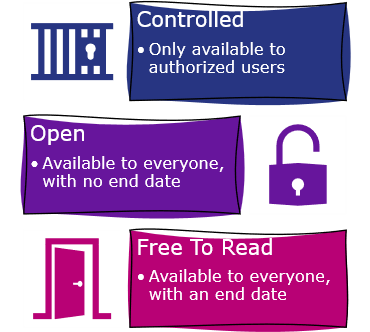
R5.1 also introduced two clear principles about how to use Access Types:
- The Access Type you’ll see in a COUNTER Report relates only to the platform producing the report. That means if you have OA books in a database that is only available to subscribers, you need to report that book usage Controlled.
- A content item can only have one Access Type. Think about journal articles that have freely available metadata but full text only for for subscribers. All usage of those articles, even usage of the free metadata, needs to be reported as Controlled.
Controlled
Controlled content is material that is only available to authorized users. We don’t specify how publishers should authorize users. The most common way is a paywall, which links authorization with subscription so that authorized users are affiliated with a subscribing library. The second common option is a datawall, where users have to register but they don’t need a subscription to read the content. Whether it’s subscription or registration, if you’re limiting access to authorized users you need to report the usage as Controlled.
Open
At times there seem to be as many definitions of OA as there are members of COUNTER. We have to remain neutral to serve the full breadth of our community, so for Open we have avoided any link between the Access Type and (a) business models or terms like Gold, (b) specific licenses like Creative Commons, or (c) the date on which something became open. If you as the publisher label something as OA, you should report it as Open, whether it’s a born-OA article under CC BY, or an old article that was originally published under copyright back in 2003.
Our definition of Open means publishers who make materials freely available (sometimes called ‘bronze’ OA) will be able to report their usage as Open, provided they intend to keep those materials openly available.
Free to Read
This Access Type applies to materials that are temporarily freely available to everyone. The special collections of coronavirus papers that many publishers made freely available during the early days of the Covid pandemic are a great example of Free to Read.
Content that is only free to some people still needs to be reported as Controlled. Something that is only free in certain countries, for example, is using geo-location as a way to authorize users.
Data Types
We use Data Type as a way to distinguish between different types of content. It’s how we make sure book usage is reported separately from video usage. R5.1 includes a wider range of Data Types than previous versions of the Code of Practice, and they fall into five buckets as shown in the figure below.
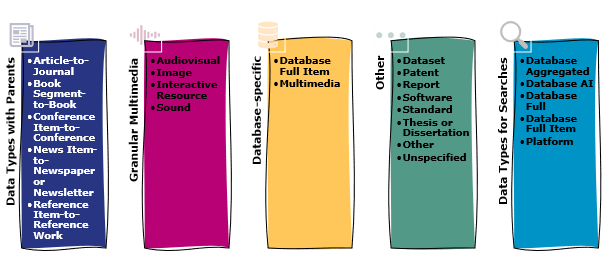
Aggregated content: Data Types with Parents
We use the word aggregated a lot in COUNTER! Individual pieces of content (items) are often aggregated into titles, and titles and items are often aggregated into databases. The first type of aggregation, item-to-title, uses Data Type-to-Parent Data Type pairings.
| Description | Parent Data Type | Data Type |
|---|---|---|
| Scholarly journals | Journal | Article |
| Newspapers, magazines, newsletters and other serialized content | Newspaper or Newsletter | News Item |
| Conference outputs, including posters, abstracts, videos, and papers | Conference | Conference Item |
| Different ways that books are broken up (e.g. chapter, essay, and section). | Book | Book Segment |
| Textbooks, encyclopaedias and other major reference works – each entry in an encyclopedia, for example, can be a Reference Item. | Reference Work | Reference Item |
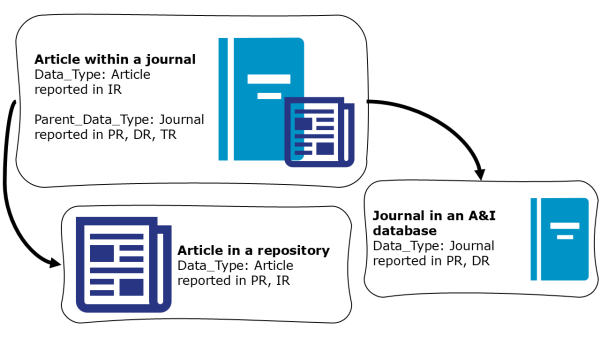
It’s not always straightforward, as one Data Type could exist alone in some platforms while being paired with a Parent Data Type in other platforms. For example,
- An article that is part of a journal on an eJournal platform has Data Type: Article and Parent Data Type: Journal. Article would show up in the Item Report, and Journal would show up in the Platform, Database and Title Reports.
- The same article in an institutional repository only has Data Type: Article, which appears in the Platform and Item Reports.
- And the same journal in an A&I database only has Data Type: Journal, which appears in the Platform and Database Reports.
Components
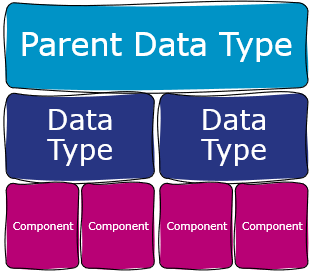
Components are optional in R5.1, which should make it easier for publishers to deliver item-level reporting. Components are a subunit of Data Types that may appear in Item Reports. A dataset may be a component of a journal article, for example.
Customizing and Extending Reports
We try to make sure that the Code of Practice covers all eventualities, but we know that some publishers may want to customize their reporting. This section of the Guide introduces the basics of customization.
Reserved Elements
There are some common use cases that are optional, not mandatory. We’ve accommodated them using Reserved Elements.
Customer ID and Institution Name. COUNTER Reports are usually for single institutions. For multi-institution reporting (e.g. for consortia), we ask publishers to break down usage by institution, with the correct Customer ID and Institution Name.
Global reports can be broken down geographically or by attribution. For country-level breakdowns, the reserved elements are Country Name and Country Code, while if you want more granular geographical information you would use Subdivision Name and Subdivision Code. Subdivision means state, so you’d use Country Name: Canada, Subdivision Name: Ontario. Attributed splits out usage that can be tied to an institution from usage that’s ‘in the wild’.
The final reserved element is Format, which has reserved values of HTML, PDF, and Other. Format is highly restricted: it may only be used in Title Reports for Total Item Requests, or in custom reports.
Custom Values
As explained above, COUNTER Elements work using controlled lists of Attributes. Publishers can add custom values to those controlled lists using a {namespace}:{value} structure. For example:
- Data Type. Custom example PubA:YouTube Embeds.
- Access Type. Custom example: PubA:Federated.
- Access Method. Custom example: PubA:Free Marketing.
- Metric Type. Custom example PubA:Total Linkouts.
Other Things To Watch For
Zero Usage
COUNTER Reports do not include zero-usage, partly to keep report sizes manageable and partly for technical reasons to do with publishers’ subscription records and usage reporting tools often being separate. If you need to identify subscription titles with zero usage, check out NISO RP-26-2019, KBART Automation: Automated Retrieval of Customer Electronic Holdings.
Missing and Unknown Values
Sometimes the information that’s needed to populate a report just isn’t available. For example, journals might have an eISSN but no print ISSB. We tell publishers not to guess, but to leave those fields empty in their COUNTER Reports.
Video Class
Translated Guides
Translations of the Friendly Guide to COUNTER Attributes, Elements and Other (Slightly) Techy Things are also available, thanks to the generosity of members of the COUNTER community who provided funds and time to help us produce them.
- Chinese translations were sponsored by SpringerNature
- French translations were produced by the Couperin Consortium and the Canadian Research Knowledge Network
- German translations were sponsored by Thieme
- Japanese translations were produced by Yuimi Hlasten at Denison College
- Spanish translations were sponsored by Gale
Video Class
Select CC for subtitles in English and German