


CONSORTIA
Consortia Reporting
There are three types of consortia reporting covered by the COUNTER Code of Practice. This guide describes the required summary and institutional reports as well as the optional detailed reports.

Introduction: Consortia Reporting In R5.1
There are three types of consortia reporting: summary reports, detailed reports and institutional reports.
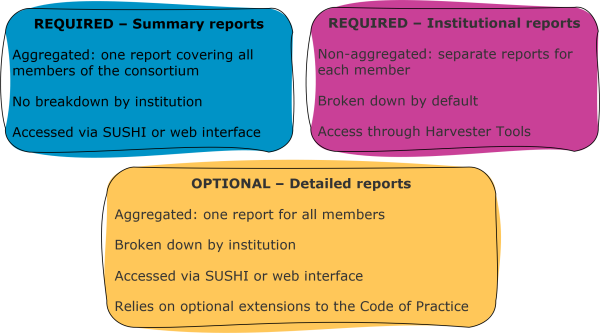
Our Summary reports show a consortium-level summary of usage. It’s not broken down by institution, so when you’re looking at a summary report you’re seeing all usage for all members of the consortium. Publishers need to deliver the Platform Report, Database Report, Title Report, and/or Item Report (as relevant to the Host Type!). Summary reports can’t be broken down to show usage at individual member institutions. Summary reports are required in R5.1.
Institutional reports are the standard individual institutional-level reports. They aren’t aggregated or summarised. We specify that consortia administrators need to be able to retrieve institutional reports for individual consortium members using the same login as they use for their summary reports.
Detailed reports are a mix. They aggregate usage reports (like a summary report), but break it down by institution (like institutional reports). Detailed reports are not required in R5.1. We made them optional because it can be very difficult for report providers to consistently generate them. For example, where a publisher’s sales and usage systems aren’t linked it may not be possible to model a consortium in the usage system.
Download Translations
Translations of the Friendly Guide are available in five languages, thanks to the generosity of members of the COUNTER community who provided funds and time to help us produce them.
- SpringerNature funded our Chinese translations
- Thieme sponsored German translations
- Gale covered the costs of our Spanish translations
- Thanks to the Couperin Consortium and the Canadian Research Knowledge Network for French translations
- And to Yuimi Hlasten at Denison College for Japanese translations
The Details
Getting Hold Of Required Institutional And Summary Reports
As a consortium manager you are able to download your summary reports in the same way as any other librarian downloading any other COUNTER report – that is, by logging into the publisher’s administration tools, or via the COUNTER API (formerly sushi).
For gathering institutional reports, one option is to collect usage reports using what we call Harvester Tools – there’s a list of them on our website. Harvester Tools typically use the COUNTER API, described in the Friendly Guide to Working with COUNTER Reports. Provided you have a list of consortia member institutions and their COUNTER API credentials, you will be able to use a Harvester Tool to collect usage reports for each institution within your consortium.
Getting Hold Of Optional Detailed Reports
While COUNTER doesn’t require detailed reports, we do have a mechanism for publishers to offer them using extensions (as described in the Friendly Guide to COUNTER Attributes, Elements, and Other (Slightly) Techy Things).
To deliver detailed reports publishers need to add extra elements to their COUNTER Reports: Customer ID (essential) and Institution Name (optional). Adding these elements, consortia-level detailed reports can be broken down by institution.
R5.1 specifies some rules about how to use the extensions to make sure that reports are consistent across the publishers who choose to use them:
- The Customer ID used in a consortium report must match the name used in a report to the individual institution, and the ID for the institution returned by the /members COUNTER API path.
- The Institution Name has to match in the same way.
- If Institution Name is provided it should be the first column in the tabular report, with Customer_ID the second column. Otherwise Customer ID should be the first column.
Remember that extensions only apply in the COUNTER Reports, not the Standard Views of COUNTER Reports. If you want to work with a Standard View you will need to apply filters to the relevant COUNTER Report: for example, you’d filter the Title Report using Data Type Book, Access Type Controlled, Access Method Regular, to get to the TR_B1 Standard View. Our Friendly Guide to Working with COUNTER Reports has more information about filtering.
Some Caveats
If you are requesting usage reports for a consortium, you might not see all usage by a member institution. Some consortium reports only show usage for content that has been purchased through the consortium. Anything that the individual member institutions have purchased directly won’t show up in those consortium reports. If that’s the case, the report provider has to make it clear in the /members path of the COUNTER API. The reverse is also true! Some report providers show everything used by all members of the consortium in their consortium reports, even where insitutions have bought it separately.
It’s also possible for the usage metrics in individual institutional reports to sum to a different number than the usage in the consortium summary report. That happens when usage can be attributed to more than one institution in a consortium, for example where their IP ranges overlap. There’s more about attribution in our Friendly Guide to COUNTER and Open Access.
Finally, we know that some institutions consider their usage data to be sensitive information. Consortium members can opt-out of consortium reporting. That will naturally affect the metrics you see in consortium reports.