


COUNTER Compliance
Implementing and Migrating COUNTER Reporting Services
This guides describes what publishers and technology providers need to do to become and stay COUNTER compliant. You’ll find implementation basics like getting started with tracking and reporting usage, as well as key information about the audit process. For those of you considering moving your publishing platform, there’s also a section on how to handle migrations. And as of April 2026, we’ve added a section for very small publishers covering our new Pathway to Compliance.

Introduction: COUNTER Compliance
This guide to becoming, and staying, COUNTER compliant serves as a practical roadmap for publishers and technology providers, including the very small publishers on our Pathway to Compliance. It details essential requirements for reporting, data tracking, and independent auditing to ensure that the usage reporting you deliver to libraries and consortia is trustworthy and reliable.
Download Translations
Translations of the Friendly Guide are available in five languages, thanks to the generosity of members of the COUNTER community who provided funds and time to help us produce them.
- SpringerNature funded our Chinese translations
- Thieme sponsored German translations
- Gale covered the costs of our Spanish translations
- Thanks to the Couperin Consortium and the Canadian Research Knowledge Network for French translations
- And to Yuimi Hlasten at Denison College for Japanese translations
The Details
COUNTER membership
COUNTER is a not-for-profit membership organization funded by membership fees and sponsorship. We maintain, develop, and ensure compliance with the COUNTER Code of Practice, a knowledge community standard which provides libraries, publishers and other interested parties with a consistent, comparable method for generating usage statistics. As an open standard, there is no purchase required to make use of the Code of Practice, and we also offer free video classes and simple documentation – like this Guide! – to introduce COUNTER to those who are unfamiliar with it.
While publishers don’t need to be members to make use of the Code of Practice or any of our educational materials, you do need to be a member to appear in the Registry as COUNTER-compliant. Our membership, a mix of publishers, technology providers, consortia, libraries, and aggregators, lead COUNTER. Our Board of Directors has oversight of the financial matters and appoints the Executive Committee to oversee operations, while our Project Director is responsible for the day-to-day. We try to make sure that all parts of our community are represented on the Board and on the Executive Committee, as well as our other working groups. You can read more about that on the How We Work page.
Getting Started With Tracking and Reporting
There’s a lot more information about our technical specification in the Code of Practice itself, as well as in the Friendly Guide to Attributes, Elements and other Techy Things. This Guide only offers a summary and should not be used as a development tool!
Tracking Usage: It’s Complicated
Usage can be tracked in several ways and we are agnostic about your approach. Page tagging, cookies and log file analysis are all perfectly valid ways to track usage.
This range of options means platforms all track usage slightly differently, so it is not possible for us to describe specific mechanisms for cleaning up the raw data. What we do is give you guidance about the rules we expect everyone to follow. They’re in Section 7 of the Code.
What to count
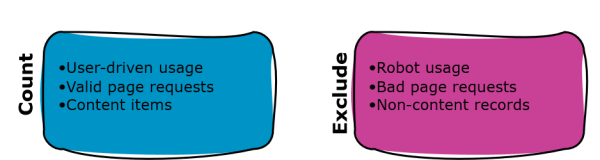
All successful, valid page requests get counted. If you’re using log files, that means HTTP status codes 200 and 304.
Until 2026, we said that you must never count bot usage. As part of our work on AI usage metrics, we’ve introduced some nuance into that rule. We still require that you eliminate all traditional bots and crawlers, especially the ones in our (not comprehensive) list in GitHub. Agentic AI usage is not considered to be bot usage that must be excluded. To learn how to report agentic usage, please read the AI best practice guidelines.
Usage is tracked in user sessions. Different platforms track sessions in different ways, and they’re all valid. We ask that you divide each day into 24 one-hour slices, and use the date plus the hour of the day in combination with the user identifier to create a session ID. Some of the identifiers we allow are
- Session ID.
- User ID (personal login or Shibboleth).
- User cookie.
- A combination of IP address plus user agent.
Creating Metrics
If you need to know more about what the different COUNTER metrics are, check out the Friendly Guide to Metrics. For this Guide, we’re looking at what does or does not count towards those metrics.
Search metrics are counted whenever a new set of search results is delivered. That means you should count a search when:
- Search results appear and change while a user types their search term.
- A user filters or facets to refine a search results list.
- A browse feature is actually search in disguise.
Usage metrics (Investigations and Requests) are counted when a user lands on a piece of content. You need to de-duplicate the total counts for each piece of content in each user session to show one unique count. That means if you have a user visiting a video thumbnail abstract five times in one session, you roll up the 5 Total Item Investigations to 1 Unique Item Investigation. If the user hits play on the video on their fifth visit, that takes your activity counts to 6 Total Item Investigations, 1 Total Item Request, 1 Unique Item Investigation and 1 Unique Item Request.
Book usage reporting changed a little in R5.1, as we described in The Friendly Guide to Changes in the Code. If you’re implementing COUNTER and you are able to identify each Book Segment (e.g. chapter), then you need to track usage at the level of the Item. If you only have whole books, and you can only track usage at the Title level, that’s ok: treat the whole book as a single Book Segment in the Item Report.
Delivering COUNTER Reports
Required Reports
A platform’s Host Type defines the COUNTER Reports and standard views that the platform needs to deliver, based on the kind of content it offers. It’s perfectly possible for platforms to have multiple Host Types, adding to the complexity. There’s a map linking Host Types to their allowable Data Types and required Reports on our website.
Report Formats
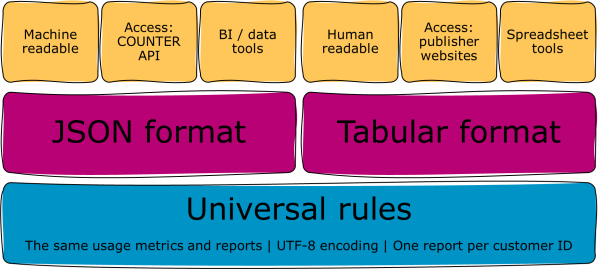
All COUNTER Reports and Standard Views of COUNTER Reports must be available in our machine-readable JSON schema, downloadable via the COUNTER API (formerly sushi) protocol, and in tabular form (e.g. as an Excel spreadsheet), usually accessed through your library admin interface. There’s more about the report formats, and the COUNTER API, in the Friendly Guide to Working With COUNTER Reports.
Timings
There are some key factors to remember about when you need to deliver reports, and the period you must be able to cover:
- You must provide reports monthly, with data updated within four weeks of the end of the reporting period. That means you need to be offering March 2026 data by 28 April 2026.
- You need to be able to deliver reports for the current year to date, plus two back years. That means by 28 April 2026, you need to be able to deliver January to March 2026, plus all of 2024 and 2025. That rule is sometimes called YTD-plus-two.
- Librarians need to be able to call a report for specific months, but if they choose not to specify a date range the default is to deliver the YTD-plus-two data. So if a librarian calls a report on 28 April 2026 and doesn’t specify a time-frame, deliver everything from January 2024 to March 2026.
Recipients
Typically, we ask you to provide COUNTER reports on a per-customer ID basis. For example, a business school might have a separate customer ID from its parent university. Where you can distinguish the usage (e.g. through separate IP ranges), the school and the university should be sent separate COUNTER reports. There are two exceptions to this per-customer rule: open access reporting and consortia reporting.
Proving Your Reports Are Compliant
Put simply, if you aren’t in the COUNTER Registry, you are not COUNTER-compliant. Being in the Registry means:
- You have developed COUNTER reporting services as outlined in the Code of Practice.
- You are compliant or are working towards compliance with the Code.
- You support the Code and the COUNTER community through membership.
Librarians often tell us that they are unsure whether their reports are being provided by COUNTER-compliant publishers, or are just structurally similar. For R5.1 we made it easier for you to prove it by putting a link to the COUNTER Registry in the report headers. We’d love for you to link to you Registry record from your library admin interface and documentation, as well as in your COUNTER reports!
Validation and Audit
We encourage every publisher to use the free COUNTER Validator to check whether their reports are valid. You should run a Validator check before you start delivering reports to libraries, and then every three to six months after that as a health check. The Validator is also a crucial part of the formal audit process.
Since 2003, an important feature of the Code has been that publishers and report providers are independently audited before they are called COUNTER-compliant. Audits can take quite a long time. Three months is the minimum, but up to six months is common for a first audit.
There are two approved COUNTER auditors: ABC, and the Alliance for Audited Media. We will also accept an audit by any Chartered Accountant (UK), Certified Public Accountant (USA), or their equivalent elsewhere, as long as they follow the rules in the Code. If you are working with a Chartered Accounted or other equivalent service, please share our template audit report form with them. It’s not mandatory, but does mean we’ll get all the information we need as part of the final report!
In-house preparation
Run your COUNTER reports through the Validator, and ideally seek feedback from one of your bigger customers in case they have identified issues with your reports.
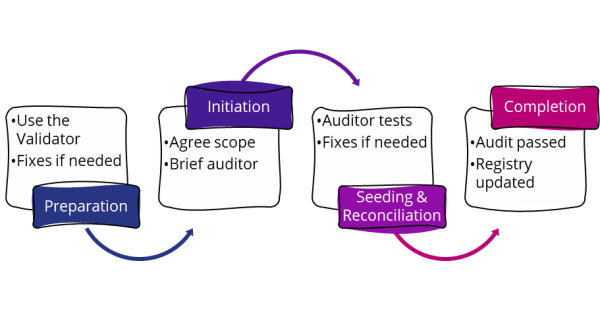
You should fix any problems that you find in this stage before moving on. If you need extra time, contact us with the Validator results, any other information about the issue you’ve identified, and what you are doing to fix it. We can offer an extension of up to three months on your audit start date.
Audit scope and initiation
You and your auditor need to agree on the scope of the audit. At a minimum, the reports you have to provide based on your Host Type must be audited. We recommend that any optional reports, such as the Item Report for a journal publisher, should also be audited. You’ll need to send your Validator results to the auditor as part of this process.
Seeding: audit begins
The auditors will use your platform to ‘seed’ activity for usage reporting. The seeding month represents your official audit start date. Your audit remains valid for twelve months from this date, so if you seed in April 2026 your audit will be valid until the end of March 2027.
Report reconciliation
This is when the auditors match up your reports with their seeding actions. Using the seeding date of April 2026, your reports would become available to the auditors by 28 May 2026 and they would reconcile them during June 2026.
If you pass first time, your audit goes straight to the next stage. Most audits result in an Interim Report, meaning the auditors have found a mismatch between their seeding actions and your reports.
If you get an Interim Report, you have three months to fix the problems the auditors found. For a Interim Report issued in June 2026, you’d have until the end of September 2026 for fixes.
Just as with the in-house preparation stage, if there are major problems identified as part of an Interim Report you can ask us for an extension of the fix period, of up to three months. It’s really important that your auditor sends their Interim Report to us so that we know what’s going on with the audit!
Once you’ve fixed the problems, your auditor will do another round of reconciliation between their actions and your reports. If your fixes are done in September 2026, they’ll reconcile the reports and issue their final report in October 2026.
Audit complete
Whether you pass first time or after a fix, your auditor needs to email your Pass Report to us when it’s ready. We use the information in the Pass Report to update the Registry and reflect your successful audit status.
What If Something Goes Wrong?
We’re here to help! If something is going wrong, contact us and we’ll work with you to resolve the issue. Broadly speaking:
- If you don’t start an audit on schedule (original or extended), you’ll show in the Registry as having an expired audit.
- If you don’t finish your fixes after your Interim Report on time (original or extended), you’ll be shown in the Registry as having a failed audit. You’ll need to start a new audit within three months.
What Happens When We Move?
We know that publishers migrate between technology providers, often because you want to offer a better user experience to end users. There are rules in the Code about how to minimise the impact of migration on your usage reporting, and on your library customers. The rules cover migrating between technology providers (e.g. platform upgrades), as well as updating your reporting service to the latest release of the Code.
Timing Your Migration
COUNTER reports are for full calendar months, so you should migrate on the first or last day of a month if that’s at all possible. Many libraries collect their usage reports annually at the end of January, so we recommend avoiding a January migration.
Report Availability
After you migrate, you still need to offer reports for YTD-plus-two. Ideally that should be a single report for the whole period. We know that’s not always technically viable, so separate reports for before and after migration is ok.
For example, you’ve migrated your platform in June 2025. It’s now April 2026, and a librarian is calling their Title Report for 2024, 2025 and January to March 2026. In the ideal scenario, this should be one report. If necessary, it could be two reports: one for 2024 and January to May 2025, and a second for June 2025 to March 2026.
You do not need to recalculate your usage when you move: just make sure the old reports remain easily accessible. We would not typically expect a report provider to charge for giving you a complete copy of your own COUNTER reports to import into the new service.
Report formats
We’d much prefer that you keep the pre-migration reports available in both JSON format (via the COUNTER API) and tabular, but we know it’s not always possible. The minimum requirement is that you migrate the tabular reports, including all Attributes, and make them available via the new library admin interface.
Dual running
One option is to run both reporting services for a while, keeping the old reports available on the original service and offering the new reports on the new service. That’s fine, provided that when you do close the old service, you stick to the YTD-plus-two rule.
Communication
Please inform your library customers well in advance of your migration. From a COUNTER perspective, we recommend:
- Three months before migration: share the outlines of your plan for migration, specifically how you’ll be confirming access to pre-migration usage reports.
- A month before migration: if you are migrating static tabular reports, remind customers to harvest their usage data through the COUNTER API before it closes.
- In the week of migration: remind customers to set up their new library admin interface access.
It’s also really important that you contact us so that we can update your Registry record. We’ll need to know if any of the platform details need to be changed, whether you’ll be offering any optional reports, and of course, the new COUNTER API details. A sentence or two for your migration notification is also appreciated!
The Pathway to Compliance: A New Option For Very Small Publishers
We know that full COUNTER compliance can be technically complicated and potentially expensive, particularly for very small publishers. That’s why we developed the Pathway to Compliance. It provides a practical, stepwise route for small publishers to start offering COUNTER reporting that will benefit them and their library customers.
The Pathway is designed for small publishers with a single publishing platform, hosting up to 150 books or 15 journals. If that’s you, and you’ve never previously been listed in the COUNTER Registry, please consider jumping on the Pathway.
Why Libarians Like The Pathway
Librarians and consortia managers regularly tell us that having to work with non-standard reporting is annoying. Non-standard reporting adds complexity to their workflows. First because the reports usually have to be manually harvested, and then because they can’t be imported and merged into library tools without extensive re-formatting and cleanup. Worse, non-standard metrics mean that the usage in non-standard reports cannot be compared with trusted, community-defined COUNTER metrics. The Pathway solves both problems: publishers on the Pathway track and report the normal COUNTER metrics, using the normal COUNTER file formats and delivery mechanisms.
What The Pathway Offers
You’ll have to track your usage just as every other COUNTER-compliant publisher does, and report all six of the usage metrics. However, we have baked in some flexibility in a lot of areas that we think will make it easier for small publishers to offer COUNTER reporting.
- You don’t have to deliver the standard views, just the main COUNTER Reports.
- If you are a book publisher, that means the Platform and Title Reports, but not the PR_P1, TR_B1, TR_B2 or TR_B3.
- If you have one database, you’ll need to offer the Platform and Database Reports but not the PR_P1, DR_D1 or DR_D2.
- We recommend offering the usual Attribute filtering options for your reports. If you can’t do that, you’ll need to include all the relevant Attributes for your reports by default.
- Unless you are a database publisher, you don’t need to offer Search metrics.
- If you can’t track denials, you can exclude those metrics from your reports.
- We’d prefer for you to offer both tabular and JSON report formats, and to set up a COUNTER API for the JSON files. If offering both formats is too difficult, you can offer just one report format. If it’s the COUNTER API that’s the sticking point, you can set up an alternative automated system – even allowing libraries to register for a regular email delivery will do.
- Ideally you should offer monthly reports, but if that’s impossible then you can drop to a quarterly or annual cycle.
Transparency
You’ll need to use the COUNTER Validator, and share the results with us, to prove that you are on the right track. However, you won’t have to undergo formal audits. Provided you can pass the Validator checks, and you are a member of COUNTER, we’ll be happy to add you to the Registry.